


Webflow vs WordPress (2026): Which Is Better for B2B Marketing Teams?
Compare Webflow vs WordPress for B2B marketing teams. Explore CMS flexibility, SEO, costs, and maintenance to choose the right platform.
TL;DR
This is not going to be the most objective comparison you're ever going to read. It's heavily opinionated for a reason: if you want to see all the exact differences objectively, you can just ask ChatGPT. We're here to share our personal experiences and explain why we think Webflow is the better choice in most cases.
We know that no platform is objectively better than another. But subjectively, we definitely have a preference. The question isn't which platform is the best overall but which is best for your specific use case. In this comparison we're focusing on B2B marketing organizations that rely on their websites to drive marketing results.
Side by side comparison
This comparison will help you understand the strengths of each platform and decide which is best for your specific needs.
We hate working in WordPress
That might sound a little dramatic, but it's true. At Overflow we've developed a healthy hatred for WordPress. Just looking at the platform or thinking about working in it is enough to make us tired.
Like most web designers and freelancers, we started out building websites in WordPress. We've built countless WordPress websites over the years. That's exactly why we're so outspoken about the differences between Webflow and WordPress.
After running into the same problems over and over again while building websites with WordPress, we found that Webflow solved 99% of them.
Does that mean Webflow is always the right solution? Absolutely not. There are situations where WordPress makes more sense. But in our opinion Webflow is the better choice in 95% of cases.
7 Reasons why we don’t work with Wordpress
- Plugin dependency: Basic functionality often relies on third-party plugins, introducing compatibility issues, security risks, and ongoing maintenance.
- Security overhead: wordPress requires continuous attention to core, theme, and plugin updates. Managed hosting helps, but doesn't eliminate the responsibility.
- Developer dependency: marketing teams can edit content themselves, but creating custom landing pages or changing layouts often requires technical support, depending on the setup.
- Maintenance costs: hosting, premium plugins, updates, backups, security monitoring, and developer support contribute to a higher total cost of ownership than the initial build price suggests.
- Inconsistent design systems: themes, page builders, and custom code can create fragmented design systems, making it harder to maintain brand consistency as a website grows.
- Performance complexity: WordPress can be extremely fast, but achieving consistent performance often requires caching, image optimization, hosting configuration, and plugin management.
- Unnecessary infrastructure management: for a B2B company that primarily needs landing pages, case studies, blog posts, and lead-generation forms, managing a complex WordPress stack can be unnecessary.
7 Reasons to Choose Webflow Over WordPress
- Greater marketing independence: create landing pages, update content, and launch campaigns without constantly relying on developers.
- Less website maintenance: no WordPress core updates, plugin conflicts, or recurring theme maintenance to manage.
- Managed security: built-in hosting security, SSL, and infrastructure protection reduce the burden of securing your website.
- Greater design freedom: build highly customized, responsive websites without being constrained by traditional themes or page builders.
- Faster time to market: design, develop, test, and publish website changes within one integrated platform.
- More consistent design systems: reusable components, variables, and templates help maintain brand consistency as your website grows.
- Less technical complexity: hosting, CMS, deployment, and performance infrastructure are managed within one platform instead of relying on multiple third-party solutions.
Webflow vs WordPress: What's the difference?
Webflow combines visual development, a structured CMS, and managed hosting in one platform. WordPress is an open-source CMS that organizations can customize and host in different environments.
- Marketing autonomy: Webflow lets marketers work with reusable components and structured content. WordPress offers similar workflows through blocks, patterns, and page builders, depending on how the site is implemented.
- Infrastructure: Webflow manages its hosting and core platform. WordPress allows greater control over hosting, server configuration, and application code.
- SEO: Both support metadata, redirects, structured data, and search-friendly content.
- AI: Webflow has official MCP connectivity and AI-assisted creation tools. WordPress.com also offers MCP support, while self-hosted WordPress can use adapters and integrations.
- Experimentation: Webflow offers Optimize as a paid product. WordPress can use testing plugins and external platforms.
- Maintenance: Webflow manages core infrastructure updates. WordPress installations require a clear owner for hosting, core, themes, and plugin maintenance.
The decision is less about what is technically possible and more about how independently your marketing team can execute.
Webflow vs WordPress: What are the similarities?
Both platforms can support scalable B2B marketing websites, including blogs, case studies, service pages, landing pages, and lead-generation workflows.
- SEO and GEO: Both can deliver crawlable HTML, metadata, internal links, and structured data.
- Integrations: Both can connect to CRMs, analytics platforms, and marketing automation systems.
- Content operations: Both support reusable content structures and independent publishing when configured well.
- AI workflows: Both can connect supported website operations to compatible AI assistants.
- Testing: Both can support experimentation and personalization.
A well-built WordPress website can outperform a poorly implemented Webflow website. Architecture, governance, and execution matter more than a platform label.
Webflow vs WordPress for SEO
Neither platform has an inherent Google ranking advantage. Both provide the foundations for strong SEO; the operational difference is how teams implement and maintain optimizations.
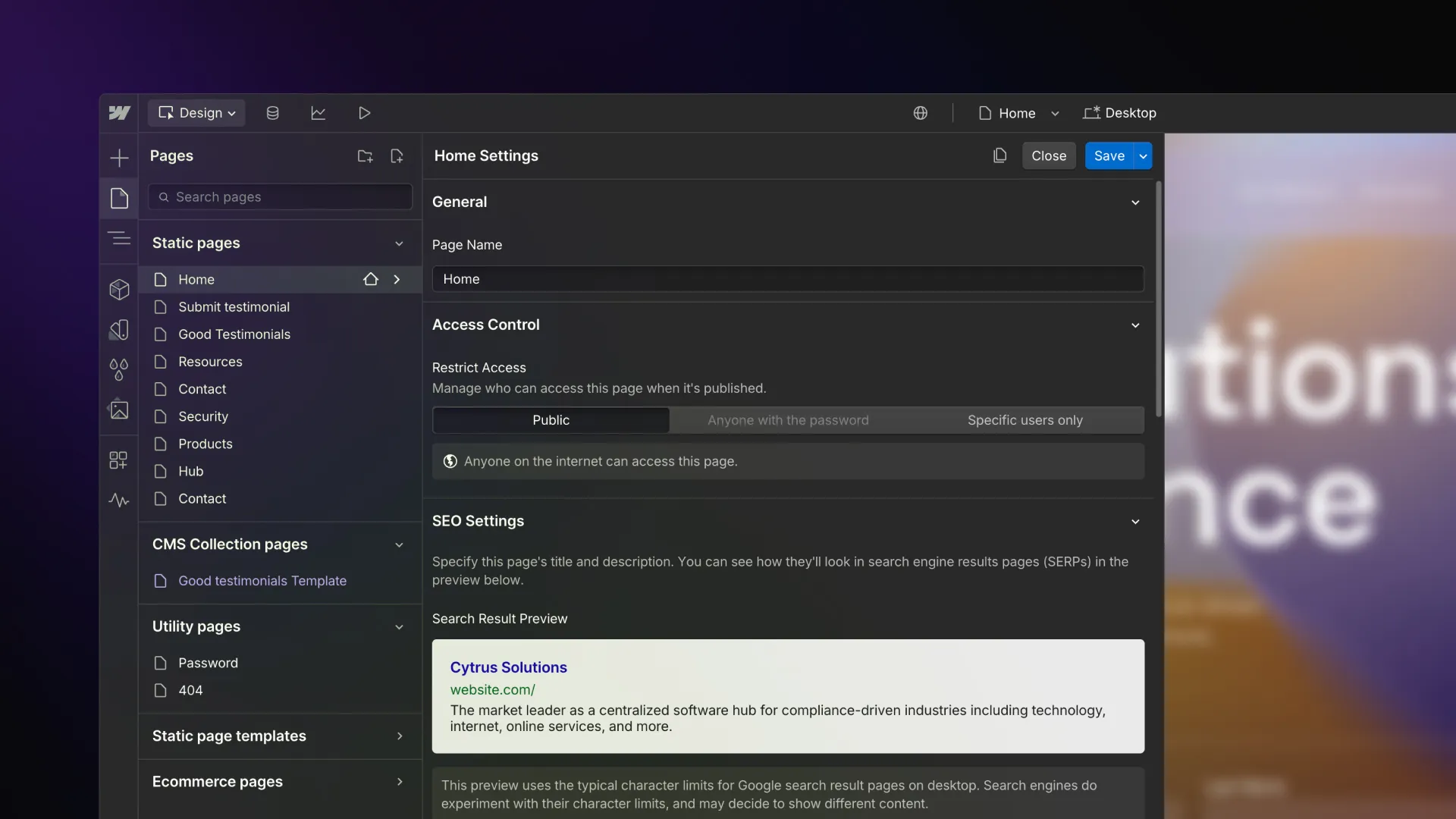
- Webflow: Built-in controls support titles, meta descriptions, canonical URLs, XML sitemaps, redirects, and custom schema markup. Dynamic CMS fields help teams keep metadata consistent across repeated page templates. Advanced requirements may still need custom code.
- WordPress: Core functionality and plugins such as Yoast SEO and Rank Math provide extensive SEO controls. Developers can customize URL behavior, schema, and server-side implementations, although additional plugins introduce configuration and maintenance responsibilities.
- Winner: Webflow for straightforward SEO operations; tie for ranking potential. WordPress remains particularly valuable where highly customized technical SEO is essential.
Google evaluates the accessibility, relevance, and quality of content, not whether a page was built with Webflow or WordPress. At Overflow, our Webflow agency incorporates SEO into CMS architecture, templates, and internal linking from the start.
Webflow vs WordPress for GEO/AEO
Both Webflow and WordPress can support AI-search visibility, but neither guarantees citations in AI-generated answers. GEO and AEO depend on accessible content, clear information architecture, credible claims, and external authority.
- Webflow: Structured CMS Collections make it practical to maintain consistent service, industry, and case-study content. Teams can manage headings, semantic markup, schema, and internal links across repeatable templates.
- WordPress: Custom post types, plugins, and developer access can deliver the same technical foundations, with more flexibility for unusual content models and backend workflows.
- Winner: Tie for AI visibility. Webflow can make ongoing content governance simpler; WordPress can support more customized implementations. Neither has a proven built-in advantage in earning AI recommendations.
Our GEO agency focuses on technical accessibility, entity clarity, useful content, and off-site evidence rather than treating a CMS choice as an AI-ranking factor.
Webflow vs WordPress for AI workflows and automation
Webflow combines native AI-assisted creation capabilities with an official MCP server for connecting compatible AI assistants to supported website operations. WordPress.com also provides official MCP support; self-hosted WordPress can use compatible adapters and integrations.
MCP stands for Model Context Protocol. It provides a standardized way for an AI assistant to use defined tools in another application, subject to the permissions and capabilities exposed by that application.
- Webflow: AI-assisted creation tools work within its website-building environment. Its official MCP server separately supports selected operations involving CMS content, site elements, pages, and assets. This can reduce manual work without requiring a separate custom integration for every supported operation.
- WordPress: WordPress.com provides MCP connectivity for supported content operations. Self-hosted installations can use solutions such as the WordPress MCP Adapter, but available tools, hosting configuration, authentication, and maintenance depend on the implementation.
- Winner: Webflow for its integrated AI creation and management workflow. WordPress is capable, especially on WordPress.com, but self-hosted setups may need additional configuration.
Consider a marketer who wants an AI assistant to review 50 service pages, suggest missing meta descriptions, and update approved entries. The assistant needs permission to inspect and modify the relevant content; the platform's MCP implementation must expose those specific actions. An MCP connection alone does not guarantee that every SEO setting is editable.
Native does not automatically mean safer. Limit permissions, review proposed changes, and maintain human approval for consequential publishing actions. For CRM and automation connectivity beyond MCP, explore our Webflow integrations hub.
Webflow vs WordPress for experimentation and personalization
Both platforms support A/B testing and personalization, but Webflow offers an integrated experimentation product.
- Webflow: Webflow Optimize supports testing, audience targeting, and personalization alongside the Webflow site environment. It is a separate paid product, and capabilities depend on the plan.
- WordPress: Teams can implement testing through plugins, external experimentation platforms, or custom code. This can be powerful but may require coordinating multiple vendors and interfaces.
- Winner: Webflow for integrated experimentation. WordPress may be preferable when an organization already relies on specialized optimization software.
Testing only matters when teams can act on results. We design B2B marketing websites to make campaign launches, lead capture, measurement, and iterative improvements practical for the people responsible for growth.
Webflow vs WordPress pricing
WordPress core software is free, while Webflow charges for its hosted platform. That does not establish which is cheaper to operate. Total cost of ownership includes development, hosting, subscriptions, maintenance, and staff time.
- Webflow: Paid Site plans bundle managed hosting and CMS capabilities according to plan limits. Workspace seats, localization, Optimize, and integrations may add costs.
- WordPress: Core software is free, but production sites need hosting and may require paid themes, plugins, security services, backups, and ongoing technical support. Managed hosting can absorb part of this work.
- Winner: Depends on the actual operating model. Webflow can reduce routine engineering work; WordPress may be economical for teams with established infrastructure and expertise.
Consider a hypothetical site requiring eight hours of technical maintenance per month at a fully loaded engineering cost of $100 per hour. That represents $9,600 annually. It is an illustration, not a WordPress benchmark or guaranteed Webflow saving.
Compare the full three-year cost, including the opportunity cost of delayed marketing launches, rather than comparing subscription prices in isolation.
Webflow vs WordPress for security and compliance
Webflow manages core hosting and application infrastructure, while WordPress provides greater control over security architecture and hosting decisions. Neither platform automatically makes a website GDPR-compliant.
- Webflow: Webflow handles core infrastructure updates and provides platform-level security controls. Organizations remain responsible for access permissions, consent management, third-party scripts, vendor agreements, and how personal data is collected and processed.
- WordPress: Organizations can select hosting regions, implement custom controls, and manage application-level security. Core software, themes, plugins, backups, and custom code need ongoing maintenance; a managed provider can handle some of these responsibilities.
- Winner: Webflow for reducing routine maintenance; WordPress for infrastructure control. Security teams should assess actual architecture, contracts, data flows, and access controls before deciding.
Which CMS is better for B2B marketing teams?
Webflow is often a stronger operational fit for B2B teams that frequently launch pages, update messaging, and optimize campaigns. Its design and content workflows are integrated, although independence still depends on a well-designed initial implementation.
- Webflow: Designers can build reusable components and structured CMS templates that marketers use to create and edit pages within defined brand rules. Visual content editing helps teams see how copy fits a layout. Collaboration features support multiple contributors, with availability depending on plan and workflow.
- WordPress: The block editor, reusable patterns, custom fields, and editorial tools can provide substantial autonomy. The experience varies across themes, plugins, and custom implementations, so consistent page creation may require more configuration.
- Winner: Webflow for cohesive design and marketing collaboration. WordPress can match many workflows when carefully implemented, but Webflow's integrated environment is compelling for teams prioritizing speed and consistency.
At Overflow, we build reusable Webflow systems around approved components, CMS structures, and clear editing permissions, so marketers can manage everyday content without rebuilding the website.
Webflow vs WordPress: Which should you choose?
Choose Webflow when your primary goal is an adaptable B2B marketing website with fewer routine technical dependencies. Choose WordPress when extensive backend customization or infrastructure control is central to your requirements.
Choose Webflow if:
- Your team frequently launches campaigns, service pages, and industry landing pages.
- You want reusable components and consistent CMS templates.
- You prefer managed infrastructure and less routine maintenance.
- You value integrated experimentation and AI-assisted workflows.
Choose WordPress if:
- You require specialized plugins or backend functionality.
- You need more control over hosting, server behavior, or application code.
- You already have an effective WordPress setup and support team.
- The migration cost would exceed the expected operational gains.
We have worked on numerous sites across both platforms and completed more than 50 website migrations. Those projects inform our preference for Webflow in B2B marketing, but migration is not automatically the right decision.
See our client case studies for examples of how we approach website architecture, migrations, and marketing performance.
Still Have Questions?
Neither platform has an inherent Google ranking advantage. Both support technical SEO, structured data, and content optimization. Webflow can simplify ongoing SEO management through built-in controls and CMS templates; WordPress offers extensive customization through plugins and development.
Webflow has explicit platform subscription costs, while WordPress core is free. Total cost depends on hosting, plugins, development, maintenance, and engineering time. Compare full ownership costs rather than subscription fees alone.
A carefully managed migration can preserve much of a site's SEO value, but rankings cannot be guaranteed. Map URLs, implement 301 redirects, preserve valuable content and metadata, update internal links, and monitor indexing and traffic after launch.
Other B2b marketeer platform comparisons